

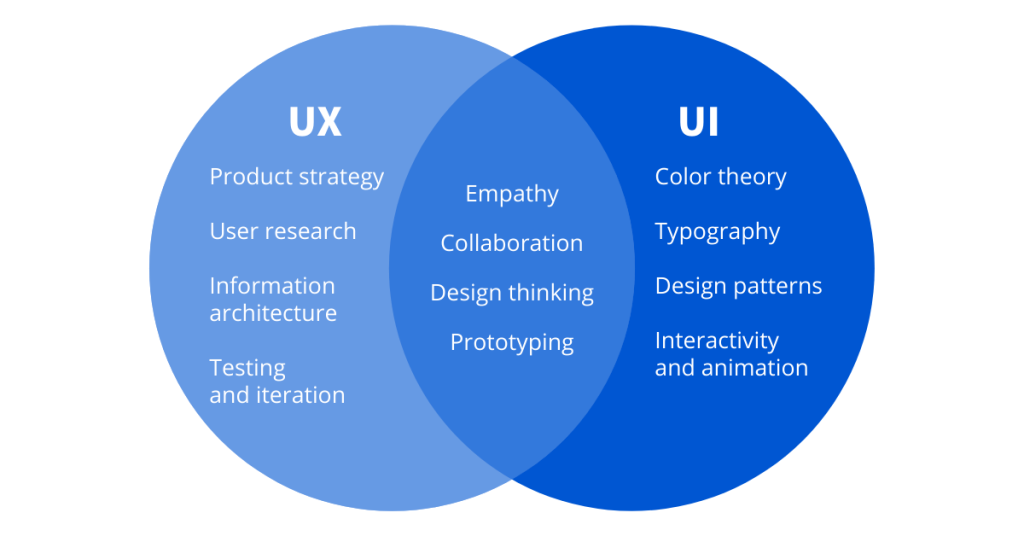
UI/UX design is the process of designing user interfaces and user experiences for software and websites. It is a critical part of the development process, as it ensures that users can easily and effectively interact with the product.
UI, or user interface, refers to the visual elements of a product, such as the layout, colors, and fonts. UX, or user experience, refers to how users feel when they interact with a product, such as their ease of use, satisfaction, and overall enjoyment.
A good UI/UX design is essential for any product that wants to be successful. It can help to increase user adoption, improve customer satisfaction, and boost sales.
Here are some of the benefits of good UI/UX design:
- Increased user adoption: A good UI/UX design can make it easier for users to learn how to use a product, which can lead to increased user adoption.
- Improved customer satisfaction: A good UI/UX design can make users more satisfied with a product, which can lead to increased customer loyalty.
- Boosted sales: A good UI/UX design can make it easier for users to find what they are looking for and make purchases, which can lead to boosted sales.

If you are looking to improve the UI/UX of your product, there are a few things you can do:
- Do user research: The first step is to understand your users and their needs. You can do this by conducting user research, such as surveys, interviews, and usability testing.
- Design with the user in mind: Once you understand your users, you can start designing with them in mind. This means creating a design that is easy to use, efficient, and visually appealing.
- Get feedback: Once you have a design, it is important to get feedback from users. This will help you to identify any areas that need improvement.
UI/UX design is a complex and ever-evolving field. However, by following the tips above, you can create a product that is both user-friendly and visually appealing.
Here are some additional tips for designing a good UI/UX:
- Keep it simple: The best UI/UX designs are simple and easy to understand. Avoid using too many colors, fonts, or features.
- Use clear and concise language: Use clear and concise language in your UI/UX design. Avoid using jargon or technical terms that users may not understand.
- Use whitespace effectively: Whitespace, or empty space, can be used to create a sense of order and hierarchy in your UI/UX design.
- Use visual cues: Visual cues, such as arrows, icons, and labels, can help users to understand how to interact with your UI/UX design.
- Test your design: It is important to test your UI/UX design with users to make sure that it is easy to use and understand.
By following these tips, you can create a UI/UX design that will help your users to have a positive experience with your product.